
Hot Wallets vs. Cold Wallets: Choosing the Right Crypto Storage Setup
Compare hot software wallets and cold hardware wallets, understand their security trade-offs, and learn how a two-wallet setup balances convenience and safety.
One of the first security decisions every cryptocurrency user faces is deciding where to store their assets. Leaving coins on a centralized exchange is convenient, yet self-custody wallets give you direct ownership of your private keys. Once you move to self-custody, wallets fall into two primary categories: hot wallets and cold wallets.
Neither type is “right” for every single task. In practice, experienced users often combine both into a simple two-tier setup.
What Is a Hot Wallet?
A hot wallet is a software application installed on an internet-connected device—such as a browser extension (MetaMask, Rabby, Phantom) or a smartphone app (Trust Wallet, Coinbase Wallet).
Because your private keys sit encrypted inside an online device, hot wallets make interacting with Web3 apps fast and seamless. You can connect to a decentralized exchange, verify balances, and confirm swaps in seconds.
Main risks of hot wallets:
- Exposure to browser malware, clipboard hijackers, or malicious extensions.
- Higher risk of accidentally signing a phishing transaction or unlimited token approval while browsing DeFi apps.
What Is a Cold Wallet?
A cold wallet stores your private keys completely offline, isolated from the internet. The most practical and popular form of cold storage is a dedicated hardware wallet (such as a Ledger, Trezor, or Keystone device).
Even when plugged into a computer via USB or paired via QR code, a hardware wallet never exports your private key to your computer. Instead, your computer sends unsigned transaction details to the hardware device; you verify the recipient address and amount on the hardware wallet’s physical screen and press physical buttons to sign.
Main trade-offs of cold wallets:
- Upfront hardware cost (typically $60–$200).
- Slightly slower workflow for frequent daily trading or minting.
- You must still safeguard your physical seed phrase backup offline.
Hot Wallet vs. Cold Wallet Comparison
| Factor | Hot Wallet (Software) | Cold Wallet (Hardware) |
|---|---|---|
| Internet Connection | Always connected (online device) | Private keys remain strictly offline |
| Cost | Free | ~$60–$200 upfront purchase |
| Best Use Case | Small spending balances, testing dApps | Long-term holdings & larger balances |
| Malware Resistance | Vulnerable to infected computers/phones | Strong protection—keys never leave chip |
| Phishing Approval Risk | High if connecting to random sites | Still vulnerable if you blindly sign bad approvals |
Important misconception: A hardware wallet protects you from remote key theft, not from knowingly signing a malicious smart contract approval. Never connect your main cold-storage vault directly to unverified websites.
The Practical Two-Wallet Strategy
Think of your crypto storage the same way you treat cash and a bank savings account:
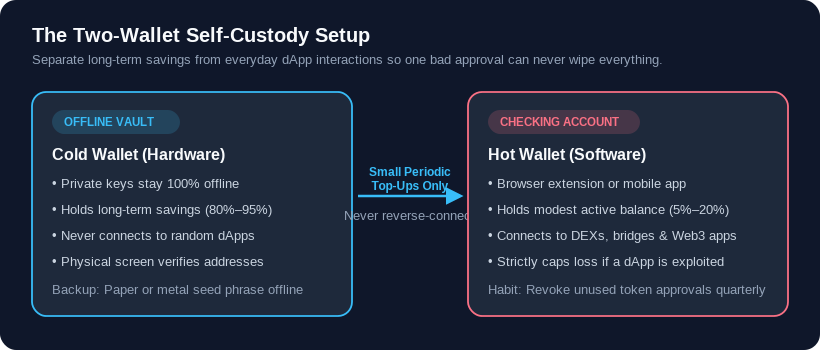
- Cold Wallet (“The Vault”): Holds long-term assets. It almost never connects to third-party dApps—it only sends and receives funds to and from your own trusted addresses.
- Hot Wallet (“The Checking Account”): Holds only a modest amount you are comfortable actively using for swaps, gas fees, or testing new Web3 applications. If a dApp ever turns out to be malicious, your exposure is strictly capped to the hot wallet balance.
Hardware Wallet Buying Tips
If you decide to purchase a cold wallet:
- Buy exclusively from the official manufacturer website (never second-hand marketplaces where devices could be tampered with).
- Generate your own brand-new seed phrase on the device screen. Never use a wallet that arrives with a pre-printed scratch-off recovery phrase card—that is a well-known physical scam.
- Keep your firmware updated strictly through the official companion app.